.svg)
Netsuite EDI
Dhanushya Sree Ramesh · September 9, 2021
What is Netsuite?
Who Uses NetSuite?
EDI Integration with Netsuite
When Do You Need EDI Integration with NetSuite?
- You’re handling increasing order volumes
As order volume grows, manually entering sales orders, invoices, and shipping data into NetSuite becomes time-consuming and error-prone. EDI integration automates these processes, saving time and reducing costly mistakes. - Retailers demand specific EDI formats or timelines
Retail partners like Walmart, Target, or Amazon often require EDI compliance to send and receive documents like Purchase Orders (850), Invoices (810), and Advance Shipping Notices (856). Without EDI integration, you may face non-compliance penalties or risk being removed from your retail partner’s vendor list.
- You’re using 3PLs or external warehouses
Working with third-party logistics providers (3PLs) often requires exchanging EDI documents like warehouse shipping orders (940), receiving advice (944), or inventory updates (846). EDI Integration keeps NetSuite in sync with external logistics systems. - You’re expanding to B2B or dropshipping
If you’re scaling into B2B, wholesale, or dropshipping models, EDI integration with Netsuite becomes essential for connecting with trading partners and automating fulfillment workflows across the supply chain. - You want to streamline your supply chain
EDI integration allows for real-time data exchange between NetSuite and your trading partners, improving visibility, accelerating shipping, and reducing stockouts or delays. - You’re tired of custom CSV uploads and email chains
If your team is manually importing/exporting data, building custom scripts, or relying on email attachments for POs or ASNs, it’s time for EDI. EDI as API Integration gives you structured and automated data flows directly within NetSuite.
Common NetSuite EDI Transactions EDI:
- 810 EDI Invoice: Automates billing and payment processes.
- 850 Purchase Order: Streamlines order creation and tracking.
- 856 Ship Notice/Manifest: Provides real-time shipping updates.
- 812 EDI Debit/Credit Memo: Manages adjustments to invoices.
- 820 EDI Cash Receipt: Tracks payment confirmations.
- 855 Purchase Order Acknowledgment: Confirms receipt of purchase orders.
- 860 Purchase Order Change Request: Facilitates order modifications.
- 940 Warehouse Shipping Order: Coordinates warehouse shipments.
- 945 Warehouse Shipping Advice: Confirms shipment details.
How to integrate EDI with NetSuite ERP?
Integrating EDI with NetSuite ERP typically involves using an EDI-as-API provider like Zenbridge, which connects via NetSuite’s REST or SOAP APIs. This setup maps standard EDI documents (e.g., EDI 850, 810, 856) to NetSuite fields, enabling seamless data exchange with trading partners using secure protocols like AS2 or SFTP. Zenbridge’s webhook-powered integration ensures real-time, event-driven communication, automating record updates and document triggers while providing monitoring tools for visibility and error tracking. This creates a scalable, automated EDI workflow that minimizes manual work and compliance risks.
For a detailed guide on setting up EDI integration with NetSuite, including step-by-step instructions and best practices, read the full article here: NetSuite EDI Integration: Complete Setup Guide 2025.
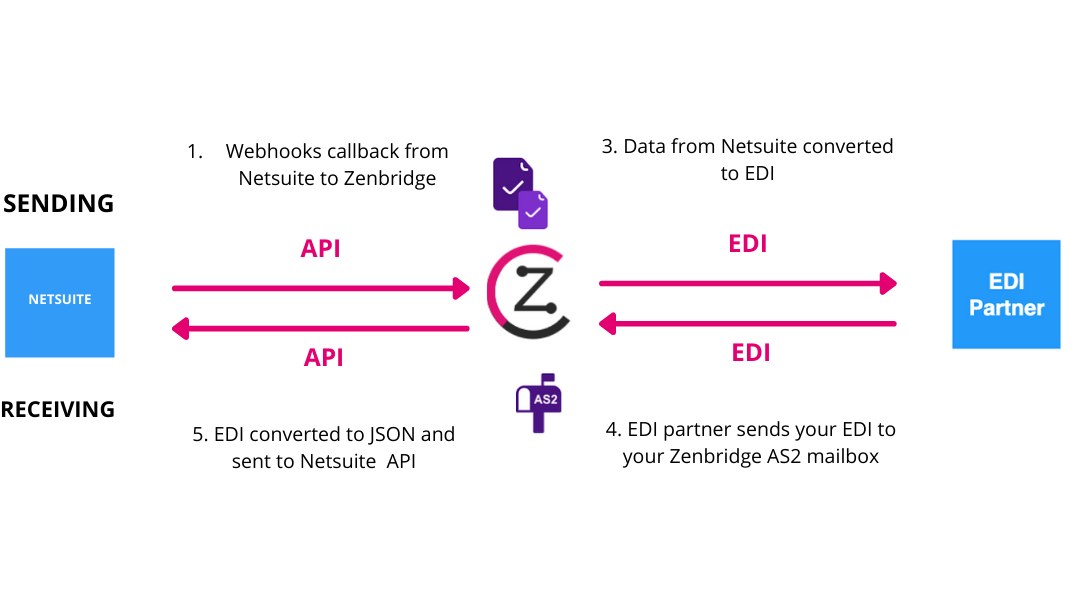
- Automate backend processes to enable faster, more efficient e-trading with your retail partners, 3PLs, and suppliers.
- Eliminate manual workarounds – Integration helps you avoid manual data entry, which is often slow and error-prone, and makes the overall setup more efficient.
- Seamlessly exchange documents like invoices, purchase orders, and shipping notices directly with your partners.